Easy to use, smart control
ESENTA SIAS

Door Intercom for Microsoft Teams

If Teams has replaced the phone system in your office, the door should ring there too. ESENTA SIAS calls Teams users directly in the Teams client: with live video from the door camera, two-way audio and door release at a click. No additional hardware, via the tested CyberGate integration.

How the door call reaches Teams

SIAS is a standards-compliant SIP video endpoint. For Microsoft Teams it is connected via CyberGate by CyberTwice, a cloud service from Microsoft AppSource / Azure Marketplace that natively connects SIP intercoms to Teams. No additional hardware is needed.

When a visitor rings, the configured Teams users receive a normal Teams call with live H.264 video from the door camera and talk directly to the visitor. The CyberGate app in the Teams client adds a dedicated button to open the door; alternatively a keypad code (DTMF) works too.

The complete step-by-step setup we tested (CyberGate account, SIAS web interface, Teams client) is documented in the guide Using ESENTA with Microsoft Teams.
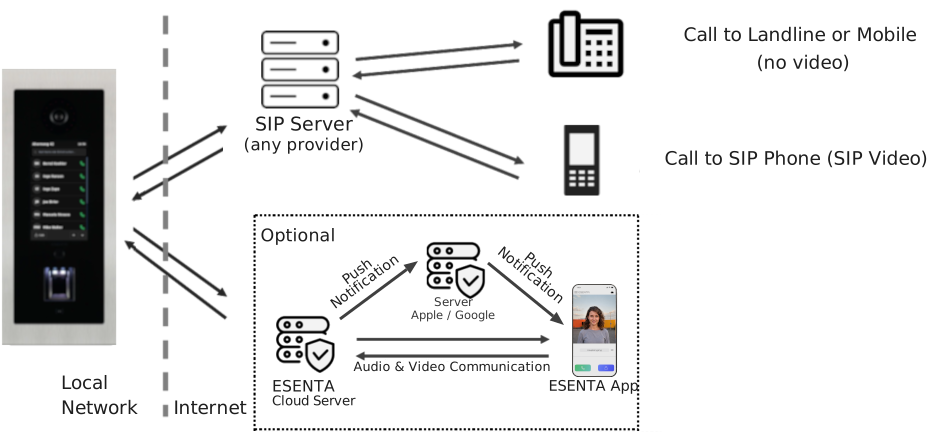
Diagram: ESENTA SIAS with an external SIP server, calls to SIP endpoints such as Microsoft Teams

For offices that call on Teams

Reaches the whole team

One bell button can have several Teams users as call targets. The door call doesn't fade away at an empty reception desk but reaches whoever is available, including in the home office.

Video and door release in the client

No second window, no extra app at the workplace: live video from the door camera, two-way audio and the open-door button appear directly in the Teams call.

Open standard instead of a silo

Because SIAS speaks open SIP, the same system also works with PBXs, the FRITZ!Box or local SIP servers. If the office changes its telephony, the door intercom stays.

Frequently asked questions

Your door will ring in Teams

Go to the tested setup guide or straight to the outdoor stations.

To the Teams guide
Deutsch English Français Italiano Español